Earlier this week I switched my personal site, this WordPress site, to run on SQLite instead of MySQL as the backing database for it. You might be wondering why. Well, this post explains why. In then next post, I’ll explain how to do it.
I had initially planned to jump straight in with a guide on how to set up WordPress to with SQLite, but I realised it made sense to provide some context first, to understand why I think dedicating any attention to running WordPress with SQlite is worth doing.
Starting out – the OG stack of technologies that made WordPress popular
Back when WordPress was just starting to get popular the most common way people ran WordPress looked a bit like this – it was a configuration known as the LAMP stack (for Linux, Apache, MySQL and most of the time, PHP).
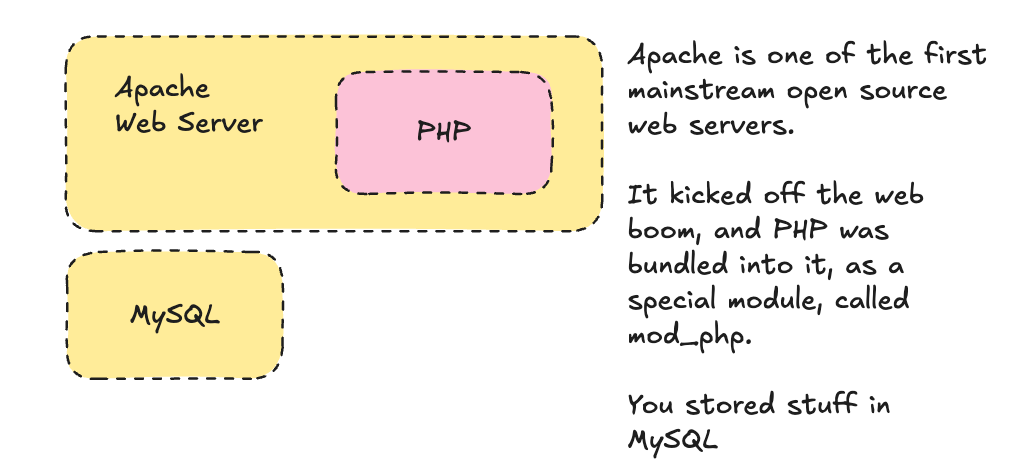
If you’ve paid for fairly cheap WordPress hosting, or used something like MAMP to run websites on a mac laptop, the chances the components used looked like this.
Switching to a new stack
Later on, as more people used WordPress, different parts got more specialised, so they could do specific things really well. In the later 2000’s and most of the 2010’s professional hosting started to look more like this set of components.
Instead of Apache web server, you had a new kid on the block, called Nginx (pronounced engine-X).
Instead of PHP being embedded in Apache, you had a separate, specialised program called PHP FPM, which was much better at handling resources, and more tuneable.
Finally, in response to Sun Microsystems, the then-owner of MySQL being bought by Oracle, a commercial database company known for cutthroat business practices, a spin-off of the project, MariaDB grew in popularity.
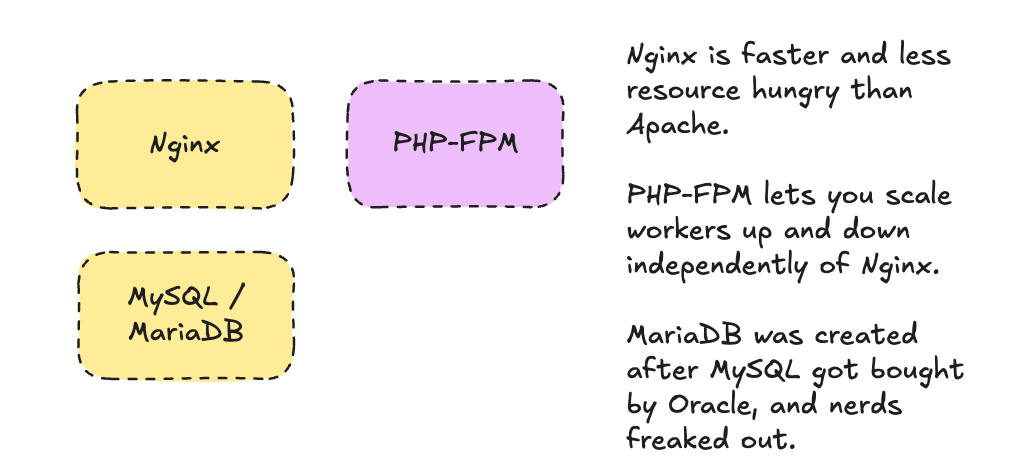
This decomposed setup looks a lot more like how many other open source modern web frameworks run, but for the longest time, if you ever worked with other programming languages and frameworks like Ruby with Ruby on Rails, Javascript with Express, or Ghost, or Python with Django or Flask, you’d likely find WordPress ‘felt’ quite different when setting up. This is partly because the “famous five minute install” that WordPress was known for sort of assumed you were setting up on some remote web host, rather than a local laptop hacking away. You can also see this in the assumption that WordPress assumes MySQL (or a MySQL compatible database) is always the database technology you connect to, where Django, Rails, and Ghost (when it was starting out) were more agnostic about the database.
This makes sense when you have a single centralised MySQL server, that hosts hundreds of websites, but it can be a pain to work with locally on your own machine. Over the last few years, there’s been a renewed interest in being able to use smaller, simpler technology for storing content and data for websites, as single servers have become more capable.
For example, we’ve seen a shift towards static sites that do away with databases altogether, and all that work generating pages on the fly by creating a load of HTML files once, that then get uploaded and served by something like Nginx. This is usually very fast, and because you have fewer moving parts, you have fewer things that can be hacked.
Elsewhere, in other communities, rather than using a full-on database management system like MySQL, a much smaller, simpler database known as SQLite has picked up mindshare, both in Python, Ruby and Javascript communities.
A shift towards SQLite and FrankenPHP
This is the stack I think you’ll see WordPress projects moving to gradually over time.
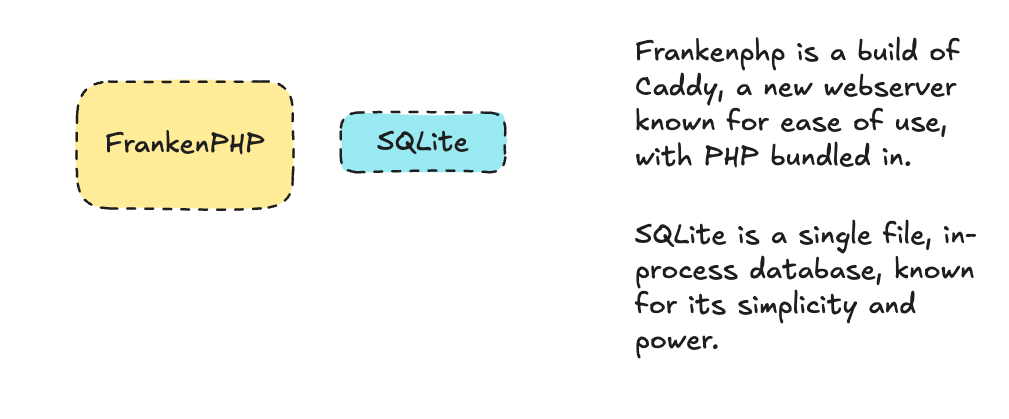
FrankenPHP is somewhat like a throwback to the simplicity of Apache, with just a single running process to think about. The underlying web server it is built on, Caddy, is well-loved, fast, reliable, and makes taking care of secure HTTPS connections simple, where it could be a pain when working with Apache or Nginx.
Caddy is extremely well documented, and FrankenPHP’s documentation is easy to navigate too. In both cases there are clear paths to commercial support if you need it.
Also, because FrankenPHP is essentially Caddy under the hood, for webhosts that already use PHP-FPM to run hundreds or thousands of websites on a single server with a small memory footprint, you don’t need to commit to a whole change. You can gradually introduce the stack where it makes sense for single website setups or ones with just a few websites held in memory, and where you’re hosting loads of sites you can still reverse proxy to PHP-FPM, like the second diagram above.
WordPress and SQLite
I mentioned that SQLite has also been seeing lots of adoption over the last few years. There a lot of good reasons for this – there’s a steady flow of new features available, allowing you to do things that you typically rely on other components for if you’re using MySQL.
For example, it now has very good support for full-text search, storing JSON natively, and via a large ecosystem of extensions, even things like vector search allowing for semantic searches, that would otherwise require their own database or datastore. Also because it runs on the same computer as the the program serving the website, fetching data is much faster, – you no longer need to make requests over a network to get data back, and because databases are just single files, things like making backups and restoring from them can be much easier.
It looks like other PHP frameworks are getting on the SQLite train too – Symfony has good support for it, as does Drupal.
On WordPress, an official effort to build in support for SQLite, sqlite-database-integration, has been running for a few years now, with the goal of landing it in the core of the WordPress project.
What about backups?
From what I can see, it’s usable enough for me to run for my personal site, and thankfully there is a well designed project to provide easy, worry free backups for SQLite, called Litestream. It offers streaming of every single change to object storage which is cheap and resilient, and the design allows simple point-in-time restore, which is useful for checking out a local snapshot to develop with.
The other nice thing is the relative simplicity. There’s definitely an upside to not having think about a relatively big piece of software running like MySQL.
Anyway, that’s the why. In the next post, I’ll cover the how. Onwards!